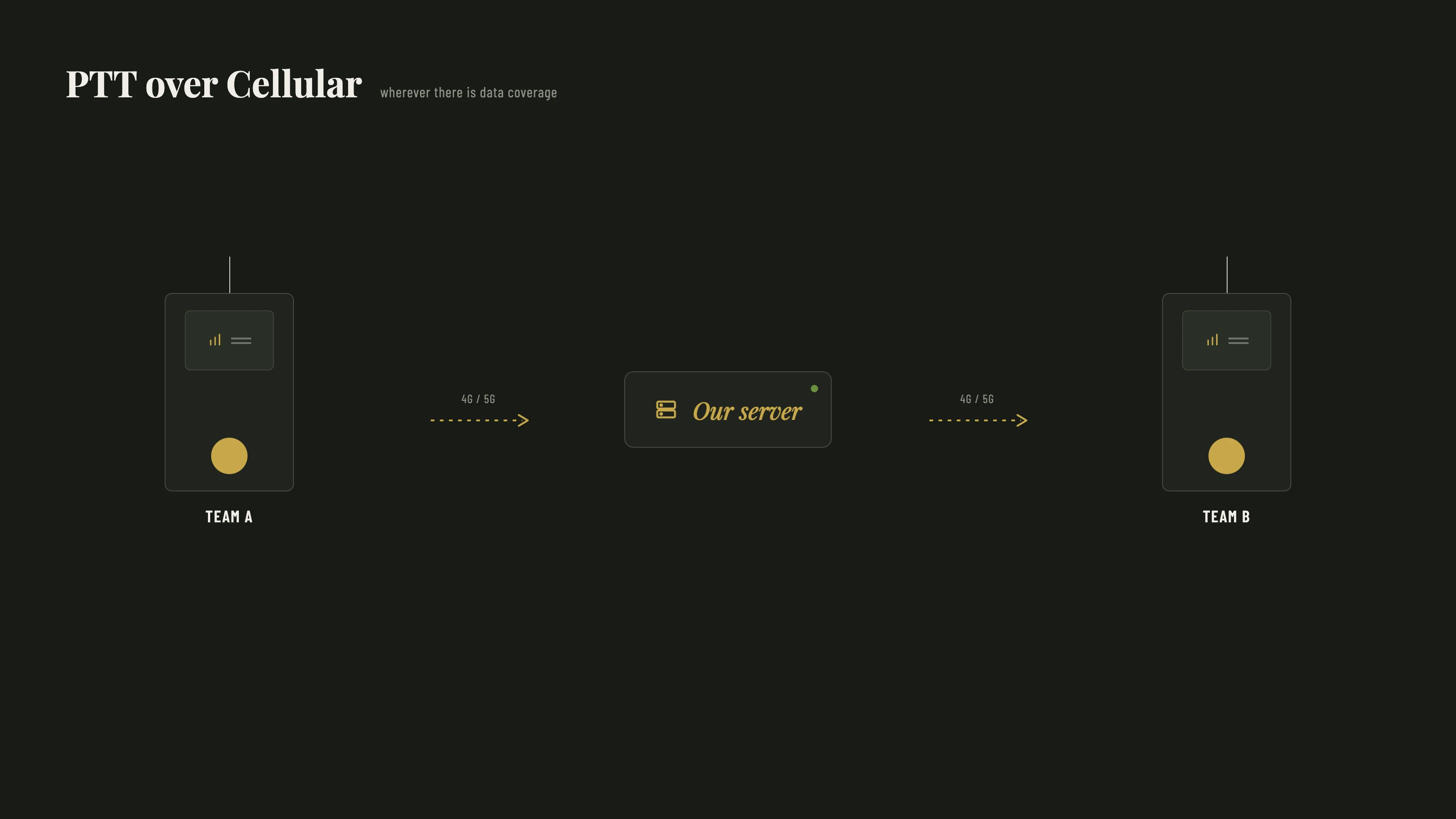
I do drone inspections. That regularly means standing on a site with several people, sometimes hundreds of metres apart, sometimes out of earshot behind a building. Classic two-way radios work there, right up until you drift out of range. And then you find yourself phoning someone you just wanted to say one quick thing to.
So a few years ago I started working with PoC — Push-to-talk over Cellular. The principle is simple: the devices don't talk to each other directly over radio waves, they go through the mobile network. You press a button, you talk, and everyone in your group hears it immediately. Exactly like a two-way radio, except the range is no longer a couple of kilometres — it's anywhere with mobile coverage.
What appealed to me was that I could run the whole thing myself. No subscription with a provider, no external platform carrying my communications. My own server, my own devices, my own network.
And not just one server. The setup runs on two, in a redundant configuration: if the primary one goes down, the second takes over automatically. Backups run on a schedule and get pulled across to the second machine, so a failure means losing minutes rather than everything. That redundancy wasn't built for the panic button — it was built because a communication system that only works when nothing is broken isn't a communication system. But it's exactly what you want underneath something your family relies on.
I set it up as a proof of concept for AirScout, and it now runs every day. Which is really the point: this isn't a thought experiment. It has been running long enough, under real use, to know that it holds. More about that here.
This piece is about what came next.
The button was already there
PoC devices aren't phones. They're rugged things with a large talk button on the side, and most of them have a second button on top: an orange or red emergency button. Hold it for two seconds and an alert goes out to your group, with your location attached.
That function is built in as standard, because PoC devices are used by people who work alone. Security guards, technicians, drivers. For them it isn't a nice-to-have.
A few of the devices I work with. The large button on the side is push-to-talk; the coloured one above it is the alarm.
Looking at that, I thought: this is exactly what I want at home.
So alongside the work network I set up a second, completely separate one. A private network for the family. Same infrastructure, different users, its own group.
For my parents, a device works well
My parents are getting older. Everything is fine right now, but there will come a point where having a button within reach isn't a bad idea.
For them a device like this is close to ideal. It sits in the house, it's big enough not to lose, the buttons are tactile, and there's nothing to configure. And it doesn't stay indoors either — they take it along on bike rides. Which is precisely the moment you're most alone and least able to reach help easily.
No app to open. No screen to unlock. A button.
For my daughters, it doesn't
Then came Maanrock. My daughter off to a two-day festival, and I wanted there to be something. Not tracking, not control. Just a button.
Except: hand a teenager a two-way radio to take to a festival and you know exactly how that ends. It stays at home, or it lives at the bottom of a bag. And fair enough — I wouldn't carry it either.
What she does always have on her is her phone.
So the question shifts. Not: how do I convince her to carry a device. But: how do I get that same button onto the thing she's already carrying.
That's where the app came from. One screen, one button, nothing else.
And it turned out to be useful for my parents too. The device sometimes stays home — you don't always take everything with you, and sometimes you simply forget. The phone always comes along. What started as a solution for a teenager who won't carry a radio became a safety net for anyone who happens not to have the device on them.
What the button does
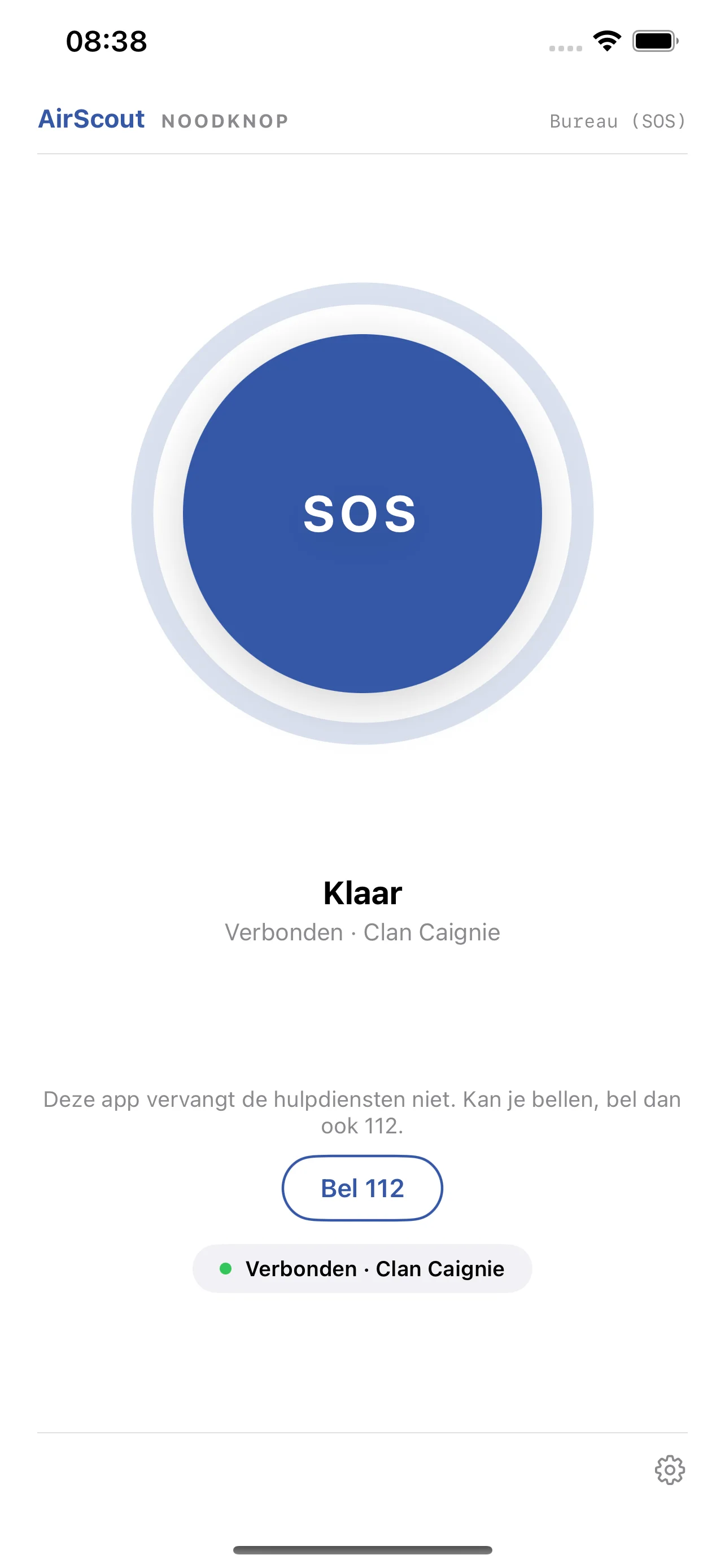
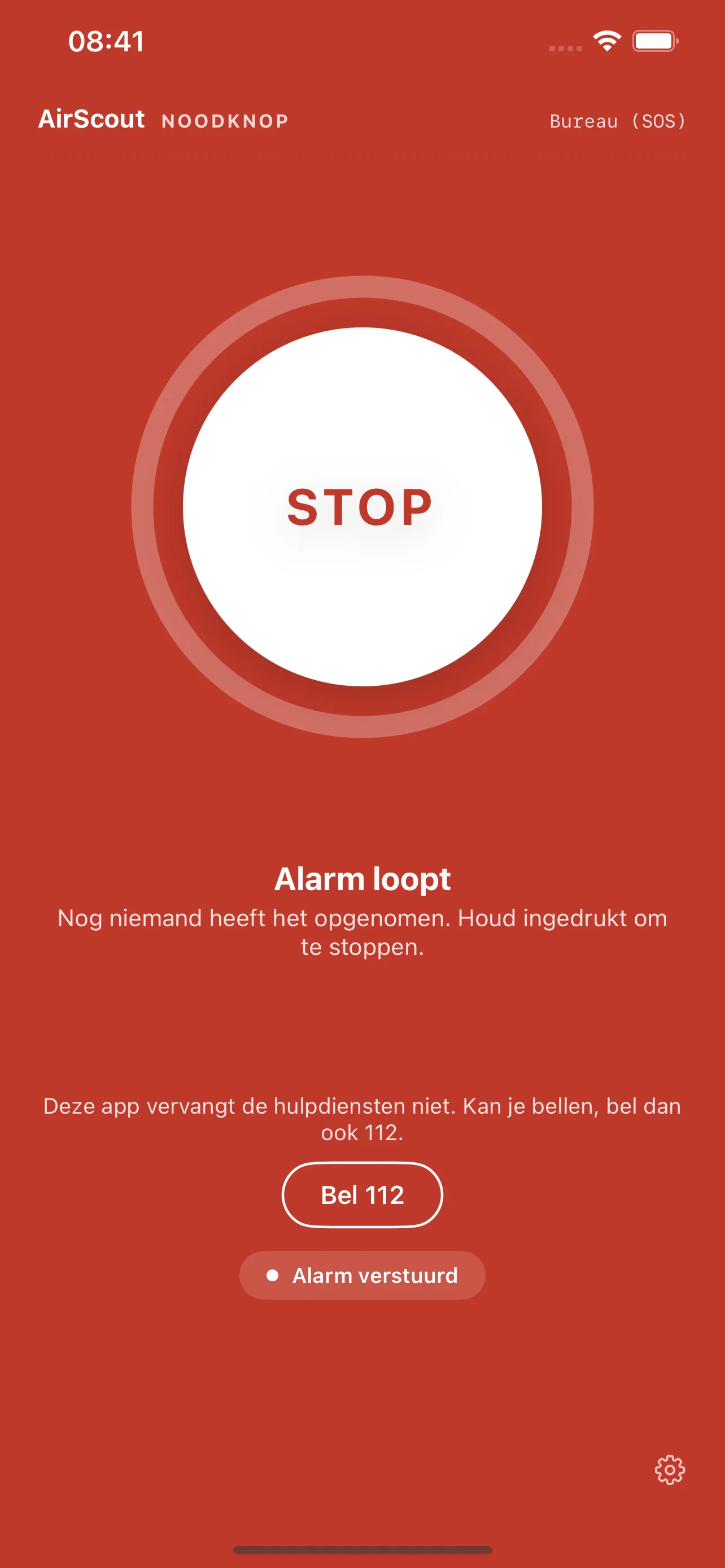
Hold it for two seconds. That's it.
On the left, the screen as it normally looks. On the right, with the alarm running.
Everyone in the family group receives an alert, with the location attached. And the microphone opens automatically to the group.
That last part matters most. A notification tells you that something is happening. An open microphone tells you what is happening. If someone can no longer type or speak, you still hear what's going on.
And the reverse: if it's a false alarm — button pressed in a pocket by accident — you hear that straight away too. Which is arguably just as valuable.
Three problems I had to solve
Silent failures. Nearly every problem I ran into had the same shape: something didn't work, and nothing told me so. An alert that was sent, arrived, and was quietly ignored because a setting was missing somewhere. In the app, everything looked fine.
For an ordinary app that's annoying. For an emergency button it's unacceptable. The worst case isn't a button that's visibly broken; it's a button everyone believes works. The lesson I took from it: never let your fallbacks kick in quietly. If a system drops back to plan B, that should be loud and visible.
A phone is not a radio. A PoC device does one thing and does it always. A smartphone is a device that continuously decides what gets to keep running and what doesn't. On Android you can keep an app permanently active. On iPhone you can't — Apple freezes apps that sit in the background, and after a restart nothing starts up on its own.
That's a defensible choice on Apple's part: it saves battery and it protects against apps quietly tracking you. But for an emergency button it's a real problem. There is a solution — Apple has a dedicated framework for walkie-talkie apps, which is how apps like Zello work — but it requires separate approval and work on the server side.
How do you distribute an app to five people? You don't want a public app, but your family still needs to be able to install it. Apple has a lesser-known option for this: unlisted distribution. The app sits in the App Store but can't be found anywhere — not through search, not through categories. Only someone with the direct link gets there.
That's one layer, and not the most important one. Because even with the link and the app installed you get nowhere: without an account on my server it's an empty shell. I create those accounts myself, one per person. The hidden link is a curtain, not a lock. If you're building a closed system, control access at the door — not at the signpost pointing to it.
There's a practical upside to going through the store that I hadn't fully appreciated beforehand. Everyone who installs via that link is on a list that updates automatically. Any change I make later gets pushed to their devices without anyone having to do anything. No "can you reinstall this", no chasing people to update. I distribute the Android version in a comparable way, with the same result.
For something that has to work when it matters, that's more valuable than it sounds. An emergency button that's three versions out of date because nobody got round to updating is a button you can't rely on.
What it is not
More important than what it can do is what it can't. That's stated plainly in the app itself, with a 112 button on the main screen, and everyone in the family has been briefed on it.
This is not a replacement for the emergency services. It reaches my family, not a dispatcher who sends an ambulance. If something serious happens, you call 112. That message is not negotiable and I've repeated it to everyone using it.
What it is, is an extra option. A way to let someone know quickly that something is wrong — or simply that you need help with something.
That distinction isn't theoretical for me. Over the past year or two a few things have happened in our circle where a button like this would have been genuinely useful. Not necessarily life-threatening situations, but moments where someone needed to reach us quickly and it turned out to be more awkward than it should be. Fumbling for a phone, finding the right number, explaining where you are. A button that sends your location and opens a microphone skips all of that.
My system is the layer that reaches the family immediately, with voice and position. The layer that always works is the one from the handset maker and the carrier. Confusing the two would be a dangerous mistake.
Where it stands
For my parents, a device with a physical button, plus the app on their phone for when that device stays home. For my daughters, just the app, on the thing they're already carrying. All on the same network, in the same group.
The next step is a proper talk function alongside the alarm button. If you're running a voice infrastructure anyway, it seems a waste to use it only for emergencies — and it's also the route to solving that background problem on iPhone.
The nice thing about this project is that it never started out as an emergency button. It started with work, with drones, and with the need to talk across a site. The rest followed because the foundation was already there.
That's usually how it goes.
One last thing
I'm aware that anything involving location touches a nerve, and rightly so. Plenty of apps track people continuously and call it safety. So to be clear about what this does: it sends a position when someone presses the button. That's the moment it reports, and that's the only moment. Not a trail, not a history, not a map I can open whenever I feel like checking on someone.
And then there's the simpler reason, the one I keep coming back to. I could build it. So why wouldn't I? Not everything needs a business case. The infrastructure was already running, the button was already a standard feature, and turning that into something my family can use cost me some evenings.
What I hadn't anticipated was the response. My parents told me it means more to them than I expected — not because they think they'll ever need it, but because it's there. That reassurance turns out to be worth as much as the function itself.
Which is, I suspect, the actual point of most safety measures.